
What's new in Kriya 0.5.3: signed releases for Android, iOS, and desktop
iOS joins Android as an export target, macOS and Windows builds can be signed and notarized instead of staying portable-only, and release credentials can now live in the project file instead of the environment.
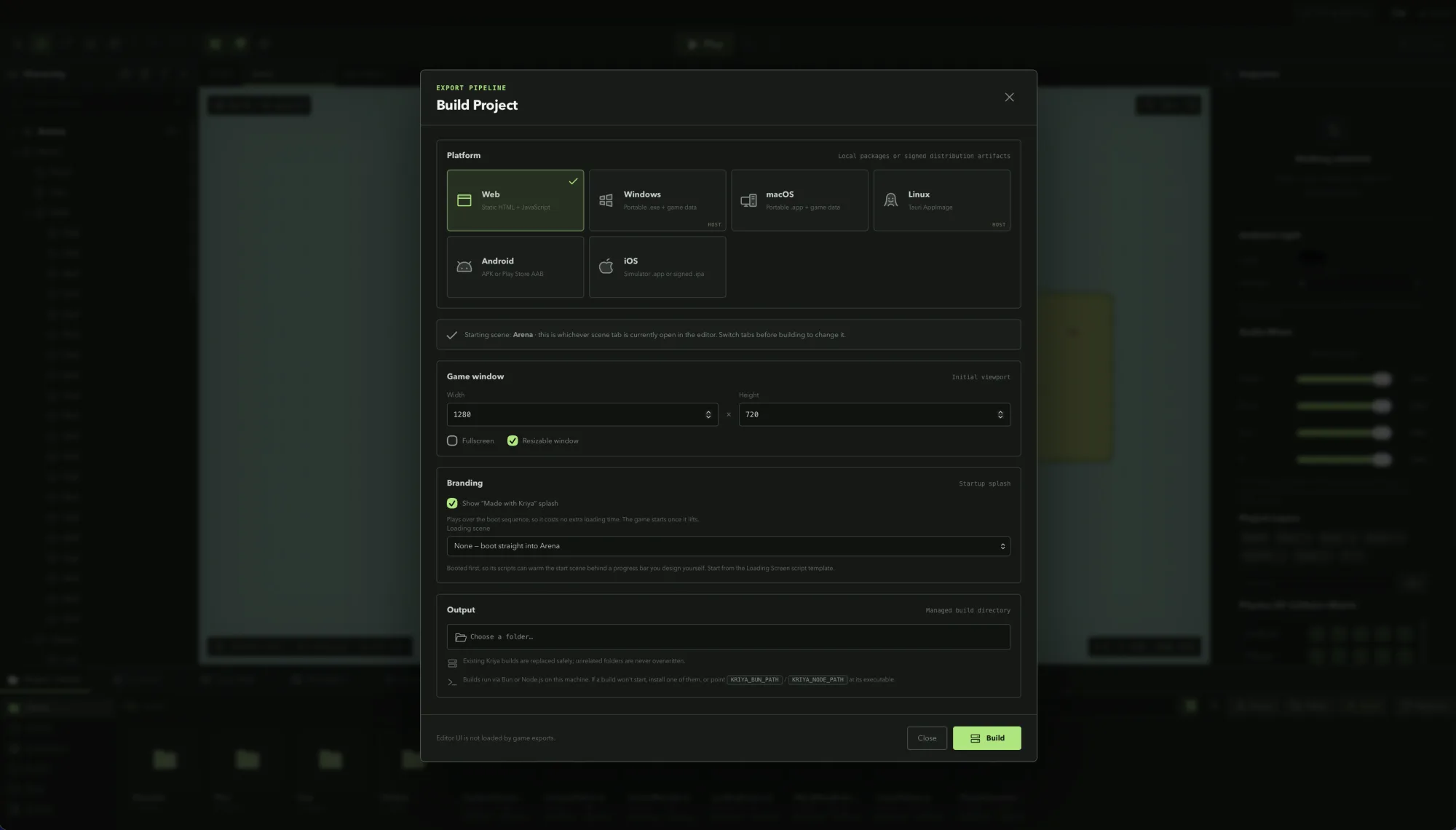
0.5.1 and 0.5.2 were mostly about the editor and the runtime. 0.5.3 is about the last mile — turning a build that runs on your machine into a build you can actually put in front of a player. Six export targets now exist, four of them signable, and the credentials for signing them no longer have to live exclusively in your shell.
iOS joins the export targets, and Android grows up
Android has been able to produce a debug APK for a while. 0.5.3 adds iOS as a full target next to it — a Simulator .app for a normal build, and a signed, provisioned IPA for a distribution one — and upgrades Android from “debug APK” to a real release pipeline: a signed APK or a Play Store AAB, your choice, built through the same generated Capacitor project either way.
Both mobile targets go through Xcode and Gradle respectively rather than anything Kriya invents itself. A distribution iOS build archives with xcodebuild archive against a Development Team, then runs -exportArchive with an export-method plist Kriya generates for App Store Connect, ad-hoc, or development-device distribution — or a custom ExportOptions.plist you point it at for manual provisioning setups. A distribution Android build adds a signingConfigs block to the generated build.gradle and produces whichever artifact type Google Play or a direct install needs.
Desktop builds can finally be signed
Until now, Windows and macOS exports were always the fast portable path — an unsigned .app or a loose .exe next to a game folder, deliberately, so the exporter could never silently consume a signing identity sitting on your machine. That’s still the default. But turning on Distribution signing now routes the build through the real Tauri packaging pipeline instead: a proper NSIS installer signed with a certificate from the Windows certificate store, or a .dmg signed with a Developer ID identity and submitted for notarization with either an App Store Connect API key or Apple ID credentials. Stapling happens automatically once notarization comes back clean.
The routing decision is a small one at the Rust layer — build_project_blocking now only takes the fast portable path for Windows and macOS when distribution signing is off — but it’s the difference between a build you can hand to a teammate and one you can actually ship.
Release credentials that can live in the project
All of this signing needs credentials — a keystore for Android, a Developer Team ID for iOS, a certificate thumbprint for Windows, a signing identity for macOS — and until this release, every one of them came exclusively from the environment the editor was launched in. That’s still true for macOS and Windows, and it’s still the recommended path for Android and iOS on CI. But for local, solo-project builds, remembering to export four KRIYA_ANDROID_* variables before every launch of the desktop editor got old fast.
The Build Project window now has a Keystore file, Key alias, Keystore password, and Key password for Android, and an Apple Team ID field for iOS, right next to the Distribution signing toggle. Filling them in saves them with the project — in the .kriya file, in plaintext, the same way an export preset works in other engines. They take precedence field by field over the matching environment variable, so a project can carry its own signing config while CI keeps using secrets it never has to check into anything. Leave a field blank and it falls straight back to KRIYA_ANDROID_KEYSTORE_PATH, KRIYA_IOS_TEAM_ID, and the rest, exactly as before.
The trade-off is explicit rather than hidden: a .kriya file with these fields filled in is a secret, and docs/releasing.md says so. Nothing about the Android or Windows signing pipeline changed to accommodate this — the generated build.gradle only ever embeds a literal credential when it came from the project; anything still sourced from the environment is read with System.getenv(...) at build time, same as always.
CLI export flags that match the editor
bun run export picked up --distribution, --bundle-id, --version, and --build-number, plus the mobile-specific --android-artifact, --ios-export-method, and --ios-orientation. Every option the Build Project window exposes now has a CLI equivalent, so a release pipeline built around the editor’s settings and one built around a CI script produce identical output.
Smaller fixes worth knowing about
- A collapsible hierarchy scene root. The Hierarchy panel’s scene root is now a real toggle button —
CaretDown/CaretRight,aria-expanded,aria-label— with collapsed state tracked per scene and an automatic expand whenever a search is active, so a collapsed hierarchy never hides a match. - No more viewport resize flicker. When the renderer resizes and the scene updates synchronously in the same tick, the patched stage now presents immediately instead of waiting for the next ticker frame — the one-frame flash on a panel drag or window resize is gone.
- Scripting API reference keeps its history. The generated
sinceversion on each scripting API symbol used to get overwritten with the current package version every time the docs regenerated, so the reference could never actually tell you when something shipped. It now reads the previous generation first and only assigns a fresh version to symbols that are genuinely new. - iOS gets Android’s fixed resolution scale. Mobile builds render at a flat 1x device pixel ratio instead of scaling up to 2x on high-DPI screens, avoiding an oversized offscreen framebuffer — previously Android-only, now iOS too.
Where this leaves the exporter
The shape hasn’t changed: Build Project is still one window, one pipeline, for every platform, and a script or CI runner can still do everything the editor can from the command line. What’s different is that “every platform” now genuinely means six, four of them can produce something you’re allowed to distribute, and getting there doesn’t require memorizing which environment variable goes with which target.