
Scripting gameplay with TypeScript, without leaving the scene
How Kriya connects typed gameplay code, inspector properties, and a predictable script lifecycle.
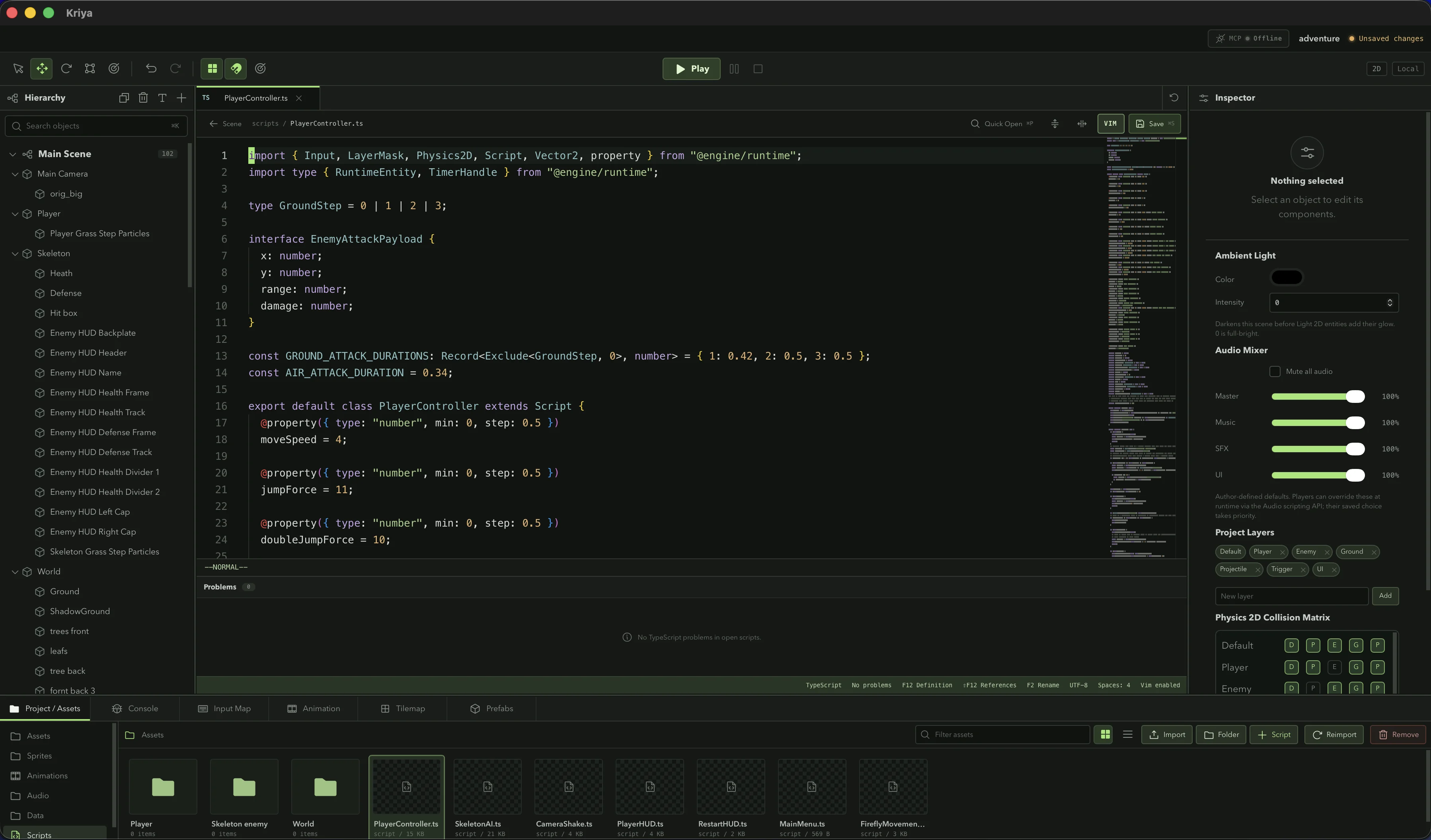
Visual authoring works best when code is close enough to use whenever a behavior becomes specific. Kriya scripts are TypeScript classes attached to entities, with engine APIs available from @engine/runtime.
That gives a script direct access to its entity and transform while keeping the public runtime surface explicit.
import { Input, Script, property } from "@engine/runtime";

export default class PlayerMovement extends Script {
  @property({ type: "number", min: 0, step: 10 })
  moveSpeed = 250;

  update() {
    const direction = Input.getAxis("MoveLeft", "MoveRight");
    const velocity = this.entity.getVelocity();
    this.entity.setVelocity(direction * this.moveSpeed, velocity.y);
  }
}
Properties are part of the workflow
The @property decorator turns a field into an editable inspector value. Designers can tune movement speed or a jump force in context instead of changing a literal in the script for every experiment.
The source remains the default, while each component instance can hold the authored value needed by that entity.
@property({ type: "boolean", label: "Can Double Jump" })
canDoubleJump = true;

@property({
  type: "enum",
  label: "Movement",
  options: ["Walk", "Run"],
})
movement = "Walk";
A lifecycle you can predict
For a new enabled script, Kriya runs awake, onEnable, and start before regular updates begin. awake and start run once for that instance. Disabling and re-enabling calls onDisable and onEnable without restarting the script.
Use update(delta) for frame-driven gameplay and fixedUpdate(delta) for work that should follow the physics step. Collision, trigger, and animation event callbacks let a script respond without polling every system each frame.
Named input instead of device checks
The Input Map connects actions to keyboard, mouse, gamepad, and touch controls. A gameplay script reads the action it cares about rather than branching on the current device.
That keeps MoveLeft, Jump, or Attack stable while the editor owns how each platform produces the action. It is a small abstraction that pays off as soon as a game moves from desktop testing to a phone.
Code and scene stay close
Kriya’s embedded script editor provides the context needed to work on gameplay without losing the hierarchy and inspector. TypeScript diagnostics catch mistakes early, while the runtime reports failures against the script that produced them.
The goal is not to hide code. It is to make the transition between authoring and coding feel like one continuous tool.